Saturday, May 8, 2021

Sitecore Architecture

       · Sitecore Experience Manager (XM)

        · Sitecore Experience Platform (XP)

 · Sitecore Experience Commerce (XC)

Sitecore Basics

· Content Delivery (CD) – handles requests from visitors across channels, determines which content to serve, and renders output in the relevant format for the channel. 

· Content Management (CM) – enables Content Authors to create, manage, and publish content.

· Experience Database (xDB) – the collection of services and storage roles that store and process experience data.

·  xConnect – the set of services that sits between xDB and any trusted client, device, or interface that wants to collect and search experience data over HTTPS. 

Sitecore Experience Manager

Sitecore Experience Manager allows you to run Sitecore XP without enabling xDB or purchasing xDB licenses. With Experience Manager, you can create, manage, and publish content to your websites.

When we need XM

· XYZ is an organization that focuses on providing information about safety rules for workers and the areas where people can surf. 

· The organization is interested in a solution that allows them to create and manage their content efficiently and easily. 

· XYZ is not planning to analyze the data from their website or to provide their visitors with an adaptive personalization experience. 

Data Exchange Framework

The Sitecore Data Exchange Framework enables you to synchronize data to and from Sitecore and any other database or system. The data exchange and synchronization processes are highly customizable and typically defined by Developers and Administrators.

Private Session State Store

The Private Session State Store is temporary storage related to session data for active visitors, which includes metadata for active visitors and active visits for personalization. The Private Session Store can be hosted on SQL Server, Redis, Azure SQL, or Azure Redis.

Shared Session State Store

The Shared Session State Store allows for the storage of information about the current contact state and related data, including all data unique to a contact that can be shared across simultaneous sessions. This information needs to remain accessible to other concurrent operations.

Device Detection

The Device Detection role is a SaaS Cloud service that provides continuously updated information on hardware and is based on User Agent string. It has no requirements regarding solution infrastructure.

IP Geolocation

The IP Geolocation role is a web service that looks up the approximate geographic location of an IP address. The service does not handle or store personal data.

Content Publishing

The Content Publishing (Publishing Service) role publishes content from the Master database to Web database and is an optional replacement for the Sitecore publishing methods that are part of the Content Management role. 


The main difference with Content Publishing, compared with the other optional components, is that as a web application, it can be scaled. This feature means that you can have multiple Content Publishing instances.

Sitecore Experience Platform

Sitecore XP contains the roles, application pools, and instances that belong to Sitecore Experience Manager, as well as xDB instances and roles (see Figure 6). Similar to Sitecore XM, Sitecore XP also can be single or scaled.

When we need XP

· A university in India has decided to open a set of new degree courses. 

· The school would like to intensify its advertising among the potential students before opening the enrollment process. 

· The university would like to provide a personalized experience for each of their website visitors and to show content that caters to the degree course the student is looking for. 

Based on these considerations, implementing the Sitecore Experience Platform is probably the best choice for this university. Sitecore XP would allow the university to track the behavior of each individual student on the school's website and also enable adaptive personalization in real-time, providing richer digital experiences for the website’s visitors.

Sitecore Experience Commerce

Sitecore XC provides all the tools a company might need to manage its e-commerce storefront and also allows marketers and merchandisers to fully personalize the end-to-end shopping experience at all stages of a transaction. In particular, Sitecore XM consists of Commerce Business Tools, which allow you to manage all your merchandising functions, and of SXA Storefront, which is an out-of-the-box storefront solution for building B2C e-commerce solutions. 


Sunday, April 11, 2021

Sitecore 10 features

  Hi Sitecore Family

 I have explain the few things in sitecore 10


1.Sitecore 10 features

2.Installing sitecore 10 using getting started template

3. Content serialization overview

4. Content serialization - Sitecore CLI

5.Content serialization - VS plugin


Happy Sitecoring!!!!

Content Serialization with Visual Studio


Step 1:

Set up the project solution.We have gotten the project from the Getting started template itself.

Øset up the folder structure to organize your modules. Modules are sets of includes—rules that determine what you want to serialize and how you want to interact with things you pull and push in your solution.

ØCreate a folder titled TestModule

Create/Edit Module with Sitecore for Visual Studio

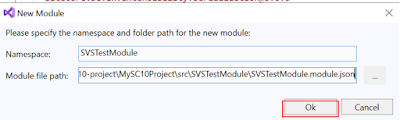
right-click on Modules, select New Module, and set the Namespace to SVSTestModule.


Right-click the SVSTestModule and click view code , you can see the code

Configure Item Include

Create Include with Sitecore Module Explorer

 In the Sitecore Module Explorer, right-click on SVSTestModule.


Define Rules


Keep Alias blank, and Allowed Push operations as (empty). 

Right click the Flowers include and click view code,the code should looks like the one which we created in TestModule


{

  "namespace": "SVSTestModule",

  "items": {

    "includes": [

      {

        "allowedPushOperations": "createUpdateAndDelete",

        "name": "Flowers Include",

        "path": "/sitecore/content/MySC10Project/Flowers",

        "scope": "itemAndDescendants",

        "rules": [

          {

            "path": "/Rose",

            "scope": "ignored"

          }

        ]

      }

    ]

  }

}

Serialize Items


Pull Items


In the Sitecore Module Explorer, right-click on Sitecore Configuration Root.


ØI got this popup message.Then I made some changes on the item under the Flowers items, then click again the pull items from Sitecore.

ØI just created a new item Iris and update the item lotus, so those two displayed here.

ØThen select and click sync


Content Serialization with Sitecore CLI


Create/Edit Module with a Text Editor

Step 1:

Set up the project solution.We have gotten the project from the Getting started template itself.

Øset up the folder structure to organize your modules. Modules are sets of includes—rules that determine what you want to serialize and how you want to interact with things you pull and push in your solution.

ØCreate a folder titled TestModule

Step 2:

ØOpen the MyProject project in Visual Studio Code. 

ØNavigate to the sitecore.json file.

Change this to "src/*/*.module.json"

Note: The Sitecore.json file is used to control how Sitecore serialization behaves. The modules section of this file is used by Sitecore serialization to locate all modules in your solution. The default configuration only refers to a single module, but we can change it to use wildcards (*/*) to locate all modules in your solution.

Step 3:

Under the src\TestModule node in your project, create a file for your module named TestModule.module.json.

add the following  code:

{
"namespace": "TestModule"
}

You have now created a module called TestModule.


Note: When developing a solution, make sure that the location of your module matches the path of the glob in your sitecore.json file (default glob is src/*/*.module.json). If it does not, add the path to the sitecore.json file.

Configure Item Include

Step 1:

Open the TestModule.module.json file and add it

{

  "namespace""TestModule",

  "items": {

    "includes": [

      {

        "name""Colors include",

        "path""/sitecore/content/MySC10Project/Colors"

      }

    ]

  }

}


This include indicates that this module will serialize the Plants item and its descendants (the scope is set to Item and Descendants by default).

Define Rules

Open the TestModule.module.json

Add this rule

"rules": [

          {

            "path""/Purple",

            "scope""ignored"

          }

        ]


Then the whole json would look like this

{

  "namespace""TestModule",

  "items": {

    "includes": [

      {

        "name""Colors include",

        "path""/sitecore/content/MySC10Project/Colors",

        "rules": [

          {

            "path""/Purple",

            "scope""ignored"

          }

        ]

      }

    ]

  }

Serialize Items

dotnet sitecore ser -h

Pull Items

When we run the serialization command, it will execute the includes and rules of the modules we have created. 

First , test the functionality before proceeding

dotnet sitecore ser pull -w

The -w allows you to see what would be executed, without actually executing. 

Run dotnet sitecore ser pull.


I have added the rules for ignoring purple color so it’s not serialized.


Steps to follow when using a PowerShell script to modify the goals in Sitecore

I have previously utilized PowerShell for item creation, modification, deletion, and presentation details in Sitecore.   Ø Recently, I attem...