Saturday, April 23, 2022

How to create the command template

Code Part

Create a base command

using Sitecore.Data.Items;

using Sitecore.Diagnostics;

using Sitecore.Shell.Framework.Commands;

namespace Feature.CommandTemplate.Commands

{

    public abstract class CommandBase : Command

    {

        public override CommandState QueryState(CommandContext context)

        {

            Assert.ArgumentNotNull((object)context, nameof(context));

            Item[] items = context.Items;

            if (items.Length != 1)

                return CommandState.Hidden;

            Item obj = items[0];

            return CommandState.Enabled;

        }

    }

}

Implement our command template

using Sitecore.Data.Items;

using Sitecore.Diagnostics;

using Sitecore.Shell.Framework.Commands;

using Sitecore.Web.UI.Sheer;

using System;


namespace Feature.CommandTemplate.Commands

{

    public class SampleCommand : CommandBase

    {

        public override void Execute(CommandContext context)

        {

            Assert.ArgumentNotNull(context, nameof(context));

            if (context.Items.Length < 1)

            {

                return;

            }

            Item obj = context.Items[0];

            Sitecore.Context.ClientPage.Start("sample.ui");

        }

    }

}

You can start your processor, I have used the sample.ui as the processor name.

Add your configuration

<configuration xmlns:patch="http://www.sitecore.net/xmlconfig/" xmlns:set="http://www.sitecore.net/xmlconfig/set/">

    <sitecore>

        <commands>

            <command name="sitecoreshades:ribbon:sample" type="Feature.CommandTemplate.Commands.SampleCommand, Feature.CommandTemplate" />

        </commands>

    </sitecore>

</configuration>

Let's see how to use it

Command templates

 What are command templates?

 ØA command template (also known as a command template definition item) defines a class and method to be called during an insert operation.

ØYou can create a command template that does not display a user interface, a command template that uses a JavaScript prompt to collect an item name or a command template that displays an ASP.NET user interface.

ØCommand templates typically invoke a wizard application that collects information from a user and then programmatically creates an appropriate set of items.

Where should I define it?

ØA command template can be assigned as an insert option to items and standard values. The command template insert option appears identical to the data template and branch template insert options.

ØThe only difference is that the command template insert option triggers a Sitecore UI command. You can assign command templates along with data templates and branch templates using insert options.

Example

ØFor example, you can use a command template to invoke a wizard that gathers information from the user before creating items.

ØUnlike data templates and branch templates, which consist of predefined structures, command templates reference Sitecore UI commands to invoke wizards or other logic used to create new items.

Let's see how to create the command template Check out here

Thursday, April 21, 2022

How to add custom validation

 Case :

We have a start and end date in the field section. I would like to allow my user to select only the future date. how we can do that?

Create a custom class:

using Sitecore.Data.Validators;

using Sitecore.Data.Fields;

using System;

using System.Runtime.Serialization;


namespace Foundation.Validation.Validators

{

    public class FutureDateValidator : StandardValidator

    {

        public FutureDateValidator() : base()

        {

        }


        public FutureDateValidator(SerializationInfo info, StreamingContext context)

            : base(info, context)

        {

        }


        protected override ValidatorResult Evaluate()

        {

            Field field = this.GetField();

            DateTime time = Sitecore.DateUtil.IsoDateToDateTime(field.Value).Date;

            if (time >= DateTime.UtcNow)

            {

                return ValidatorResult.Valid;

            }

            this.Text = this.GetText("The field \"{0}\" should contain a future date", field.DisplayName);

            return ValidatorResult.CriticalError;

        }

        protected override ValidatorResult GetMaxValidatorResult() { return GetFailedResult(ValidatorResult.CriticalError); }

        public override string Name => "Date In Future Validator";

    }

}

Create the rule definition item in Sitecore


Add your rules to your fields


Test the validation


Updated the past date and try to save the page

Validation Rules

 The default validation rules

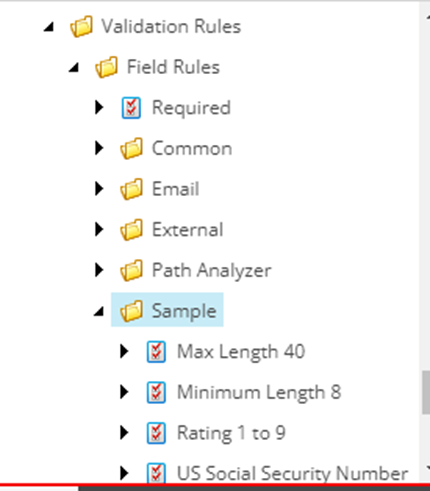
You can find some sample validation rules

/sitecore/system/Settings/Validation Rules/Field Rules/Sample

We can duplicate the sample item for creating new one

Case 1:

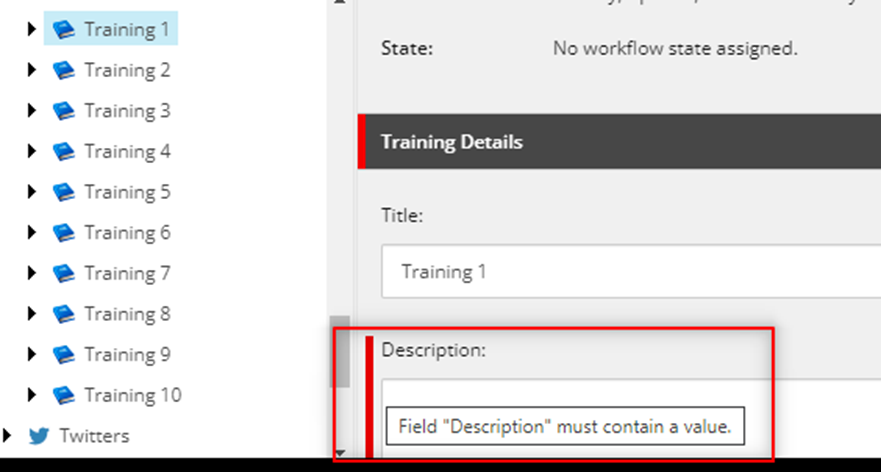
I like to set the required option to my field


Case 2:

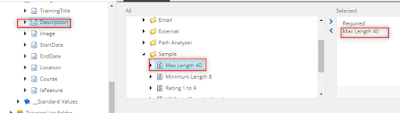
I like to set the required and maximum length of the field

I’ll  add maximum 40 to my field

Let’s check the validation

I have given the field more than 40


But it allows me to save the page 

Case 3:

I would like to stop my user to save the page when they have errors in the item

Go to your rule path

/sitecore/system/Settings/Validation Rules/Field Rules/Sample/Max Length 40

Parameters : MaxLength=40&Result=FatalError

Let’s test

 Case 4:

I don’t like to give the error popup just like to show the warning

Parameters : MaxLength=40&Result=Warning

Case 5:

I like to show an error when the field has exceeded the length and would like to allow the user to save the item without fixing it

Parameters: MaxLength=40&Result=CriticalError


How to add the Custom validation Custom rule-Ignore past date

Validation Intro


Everyday content authors are working with Sitecore contents . As a backend developer we need to give the validation rules for all the required fields. let’s see where we need to define and how to use it?

The validation options

Ø  Validation options are available in the Validation Rules section of the data template standard values and template field definitions. Sitecore comes with a set of default validation options as described in the following table.

Ø  For demo I have updated the validation for one field in template.

Ø  Go to your template field and Validation section


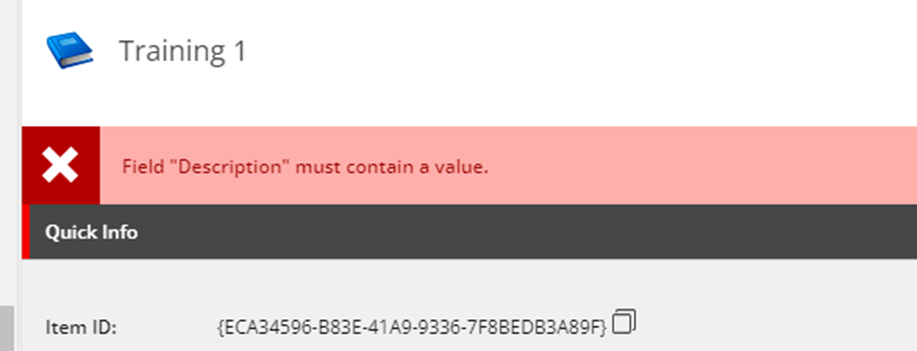
Where do I set and see my validation error?

Quick Action Bar

Validation issues appear in the Quick Action Bar on the left in Content Editor


Validation Button

Validation issues appear when the user chooses the Validation command from the Proofing group on the Review tab, and when the user invokes a transition to a workflow state, which includes the workflow validation action.


Validation Bar

Validation issues appear in the Validation bar on the right in Content Editor


Workflow Validation Rules

Validation issues appear in the user interface when a user chooses a workflow command associated with the workflow validation action. The user cannot complete the workflow action without resolving all validation errors.


Experience Editor View

Click here to learn more about Validation Rules

Steps to follow when using a PowerShell script to modify the goals in Sitecore

I have previously utilized PowerShell for item creation, modification, deletion, and presentation details in Sitecore.   Ø Recently, I attem...